
Your shopping cart is empty!
Shopping Cart
0 item(s) - FreeCustomization and Conversion for: Ctrader, MetaTrader(MT4, MT5), Thinkorswim, NinjaTrader, MultiCharts, Tradingview, Prorealtime, SierraChart, etc.
License renew price will be 20% off for the 2nd year and after.

What's the best way to backtest your strategy in NinjaTrader?
You should be aware that great discrepancies exist between Real-Time and Backtest.Let's take a quick look at all possible ways to do a backtest.
Most people will choose Strategy Analyzer as their first option.
However, a major drawback is that its historical data contain only the Open, High, Low and Close with no intra-bar tick information.
Hence, all orders are filled based on four data points (OHLC) as these are only known information during a backtest.
If your entry point is based on the previous bar's close, Strategy Analyzer may still generate results close to real time.
Click here for more info about Strategy Analyzer.
Market Replay will be the second option.
This method is very close to real time live trading.
Orders are filled dynamically as it uses intra-bar tick date (both price and volume) to determine if an order should be filled or not.
The best part of this methold is that you can speed up, forward, hold and backward.
Because fill prices dependant on volume at availabe bid or ask price, some orders may not be filled in live trading even if they can be filled in Market Replay because
Click here for more info about Market Replay.
Simulated Data Feed will be the third option.
You can use this method to test your strategy offline. The advantage is that you can fully control the trend (price directions) as well as to test some special price movements.
Click here for more info about Simulated Data Feed.
Real-Time Simulation is the last possible option.
By running your stategy in real time during the live session, the results are almost the same as live trading.
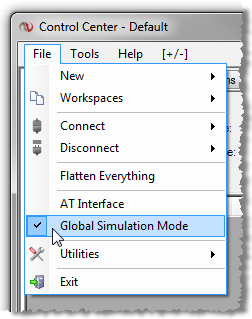
To apply this method, either to test in your Sim account or turn on the Global Simulation Mode.
When Global Simulation Mode is enabled, all order entry interfaces (SuperDOM, Chart Trader, etc.) will be set exclusively to the Sim101 account. Enabling this is not necessary in order to route orders through simulation, you can still set any order entry interface to the Sim101 account individually. However, Global Simulation Mode provides you a method to ensure that you do not accidentally place an order to your live trading account.
| Strategy Analyzer | Market Replay | Simulated Data Feed | Real-Time | |
| Intra-bar tick | No | Yes | Yes | Yes |
| Order filled when trading target hit. | Yes | Yes/No | Yes | Yes/No |
| Fill prices | you may receive better or worse fill prices dependant on where the bid or ask price is and what volume is available at this market prices. | |||
| strategies processed at | Close only | Tick by Tick | ||
| Pros | Detailed results | speed control | trend control | clostest to live trading- |
| Cons | unreal results | limited amount of replay data | No volume | Only available during live session |
Discrepancies: Real-Time vs Backtest
Click here for more examples of the difference between the realtime and backtest from other traders.Copyright @ 2026 Patternsmart - All rights reserved
This website is for educational and informational
purposes only and should not be considered a solicitation to buy or sell a
futures contract or make any other type of investment decision. It's not recommended to use any single indicator as sole evaluation criteria. The companies
and services listed on this website are not to be considered a recommendation
and it is the reader's responsibility to evaluate any product, service, or
company. patternsmart is not responsible for the accuracy or content of any
product, service or company linked to on this website.
Futures trading
contains substantial risk and is not for every investor.Please read the following risk disclosure before considering the
trading of this product:
Futures Risk Disclosure. An investor could
potentially lose all or more than the initial investment. Risk capital is money
that can be lost without jeopardizing ones financial security or life style.
Only risk capital should be used for trading and only those with sufficient risk
capital should consider trading. Past performance is not necessarily indicative
of future results.
Trading stocks, options, futures and forex involves
speculation, and the risk of loss can be substantial.Investor must consider all
relevant risk factors, including their own personal financial situation, before
trading. Trading foreign exchange on margin carries a high level of risk, as
well as its own unique risk factors. Forex investments are subject to
counter-party risk, as there is no central clearing organization for these
transactions. Please read the following risk disclosure before considering the
trading of this product:
Forex Risk Disclosure. Spreads, Straddles, and other multiple-leg option
strategies can entail substantial transaction costs, including multiple
commissions, which may impact any potential return. Options are not suitable for
all investors as the special risks inherent to options trading may expose
investors to potentially rapid and substantial losses. Prior to trading options,
you should carefully read
Characteristics and Risks of Standardized Options.
patternsmart.com
will not be held liable for the loss of money or any damage caused from relying
on the information on this site. Any investment decision you make in your account is solely your responsibility.
TESTIMONIAL DISCLOSURE: TESTIMONIALS APPEARING ON OUR SITE MAY NOT BE REPRESENTATIVE OF THE EXPERIENCE OF OTHER CLIENTS OR CUSTOMERS AND IS NOT A GUARANTEE OF FUTURE PERFORMANCE OR SUCCESS.